Drive-Up Storage Units in Millsboro, DE
Sometimes your main storage needs are all about more space, but there are times when convenience is as much a factor as the space itself. When your storage unit sits at ground level, and you can pull your vehicle right up to the unit door, loading and unloading takes fewer steps and less of your time. If you are looking for drive-up storage units in Millsboro, DE, this guide explains how this type of self storage helps tenants stay organized and efficient.
Rt 24 Self Storage is the Millsboro area’s #1 choice for storage rentals, located on John J Williams Hwy. You can compare our drive-up storage units at Rt 24 Self Storage online, and find your storage solution in seconds.
Table of Contents
I. How Drive-Up Access Saves Time and Effort
II. How to Pick the Right Drive-Up Unit Size
III. How to Load a Drive-Up Unit Efficiently
IV. Frequently Asked Questions About Drive-Up Storage Units
How Drive-Up Access Saves Time and Effort
A large storage load might involve dozens of trips between your moving vehicle and the storage unit. Depending on your storage situation, you may also be looking to access your rental frequently to swap items in and out.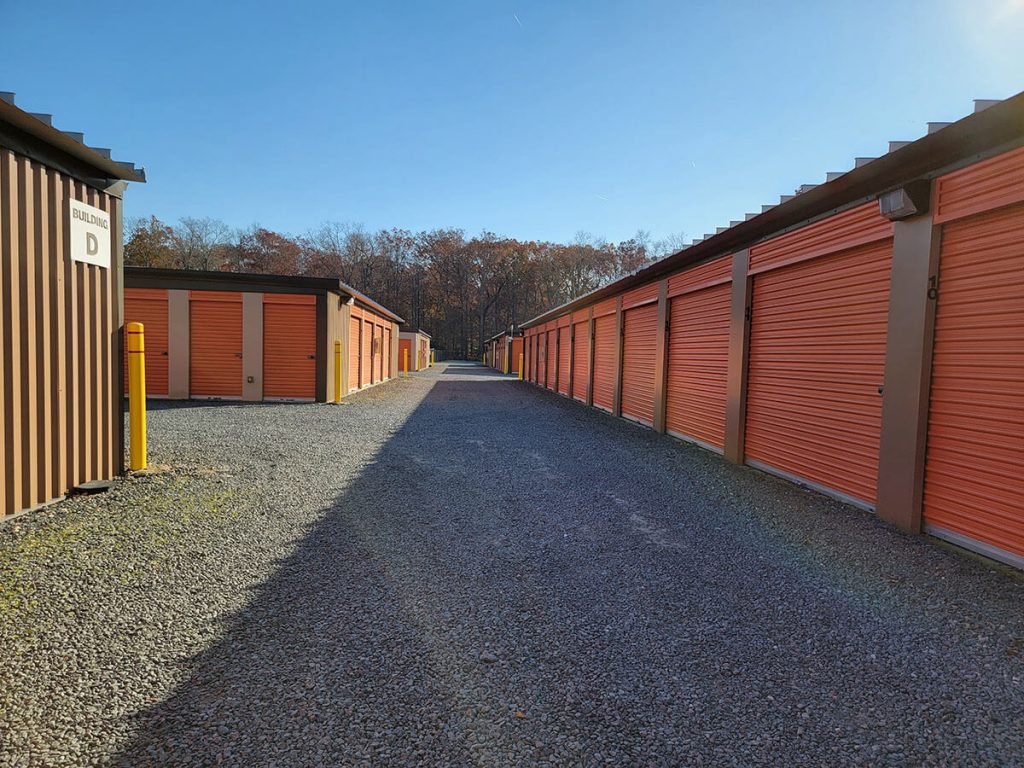
A drive-up storage unit has its own roll-up door at ground level. You park beside the door, so you carry items a short distance instead of down a hallway, up stairs, or through an elevator. That shorter walk makes each trip easier, and the savings add up over many visits.
What Type of Self Storage Do You Need?
Sometimes you need greater protection from environmental factors than outdoor storage units are able to provide. Rt 24 Self Storage also offers temperature-controlled storage in Millsboro. These units are inside a building with interior doors, so your belongings are not exposed to the outdoor weather. Regardless of any changes occurring outside, these spaces maintain consistent temperature levels, so your belongings never have to feel extremes or fluctuations.
Choose drive-up storage for frequent loading and heavy or bulky items. Choose temperature-controlled storage for sensitive belongings like electronics, documents, and photos. Contact our office if you’d like to talk through your storage needs with one of our experts.
How to Pick the Right Drive-Up Unit Size
Do you know what storage unit size you need? Start by listing what you plan to store. Then estimate how much floor space those items need. Leave room to walk, and plan a clear path to the back of the unit. A little extra space makes it easier to reach things later without moving everything.
Our online storage unit size calculator can give you a quick recommendation!
| Storage Need | Typical Items | Unit to Consider |
|---|---|---|
| Small overflow | Boxes, decor, a few totes | 5×10 Drive Up |
| Seasonal or sports gear | Bikes, camping gear, patio furniture | 10×10 Drive Up |
| Apartment or room of furniture | Mattress, sofa, dresser, boxes | 10×15 or 10×20 Drive Up |
| Large household or renovation | Multiple rooms of furniture and boxes | 10×25 or 10×30 Drive Up |
Check the availability of your preferred storage unit size at our Rt 24 Self Storage facility before you plan your move.
How to Load a Drive-Up Storage Unit Efficiently
A smooth loading day starts with a plan. Think about what goes in first and what you will need to reach last. The tips below can help you load with less effort and fewer trips.
1. Measure Your Largest Items First
Measure your biggest pieces before you arrive, such as a sofa, a dresser, or a folded tent. Compare those measurements with the door width and height. Knowing the answer ahead of time saves you from carrying an item back to the car.
2. Back Up Your Vehicle Close to the Unit Door
Position your vehicle near the unit door, and leave room to walk around it. A close approach shortens each trip. Keep the path clear of other vehicles, so you can move safely between the car and the unit.
3. Unload Heavy Pieces First
Place the heaviest items along the back wall first. Starting at the back keeps the front open for things you will reach for later. It also means you will not need to shift heavy pieces around once lighter boxes are in place.
4. Stack Smart and Keep Stacks Stable
Stack lighter boxes on top of sturdy bases, and keep each stack even. Avoid tall towers that lean. A stable stack is easier to move past and simpler to search when you need something.
5. Leave a Narrow Aisle for Access
Keep a path open down the center of the unit. That aisle lets you reach items in the back without moving everything in front of them. Over several visits, that small walkway can save a good amount of time.
6. Place Frequently Used Items Near the Door
Put the things you will need most often near the entrance. Seasonal gear, tools, and boxes you open regularly are good candidates. Keeping them close reduces digging through the unit on each visit.
7. Bring a Few Basics
Pack a tape measure, work gloves, a marker for labels, and a flashlight. A hand truck or dolly can help with boxes and appliances. Moving supplies are sold on-site at Rt 24 Self Storage, which can save a trip if you need boxes or tape.
8. Take a Quick Photo
Once you finish, take a photo of how everything is arranged. The picture helps you find items later and can be useful for your records.
Frequently Asked Questions About Drive-Up Storage
How much faster is loading at a drive-up unit?
There is no single answer, since it depends on your load. Fewer steps, no elevators, and no long hallways usually make loading quicker, especially for large or heavy items.
Can I park beside my drive-up storage unit door?
Drive-up units are designed for loading from your vehicle. Leave room for others to pass, and check the lane width and turning space during your visit.
Will humidity or outdoor air harm my belongings?
It can, especially if items are damp or packed poorly. Dry everything fully, use plastic bins with lids, and lift boxes off the floor to protect them from moisture. If your items need steadier conditions, ask about temperature-controlled units.
When can I get to my unit?
Access hours at Rt 24 Self Storage run from 6:00 a.m. to 10:00 p.m. every day. Office hours are different, so plan calls and visits around both schedules.
Can I rent self storage online?
Yes. Rt 24 Self Storage offers an online rental process, so you can browse and reserve storage units in Millsboro, DE, from home. Our online storage calculator can also help you choose a size.
Make Your Next Move Easier With Drive-Up Storage
Weekends are short. Spend them using your gear, not hauling it in and out of storage. Drive-up storage units in Millsboro, DE, give you a door at ground level, so each trip can be shorter and simpler. Compare storage unit sizes available at Rt 24 Self Storage in Millsboro.

